How to Find the Right Amazon KDP and Amazon Ads Keywords: A Strategic Guide
Visibility on Amazon comes down to one simple principle: put your book exactly where shoppers are actively searching, ready to buy.
Whether you are filling your 7 KDP keyword boxes or building profitable Amazon Ads (Sponsored Products) campaigns, the method is the same: find specific terms that combine strong buying intent with manageable competition. Filling those fields on instinct or spending your ad budget at random leaves your book invisible.
1. Why standard e-commerce tools and manual research fall short
Most independent authors find themselves stuck between two ineffective extremes:
- Manual research (Amazon search bar suggestions): typing letters into the search bar shows you what people search for, but provides no hard data: no search volume figures, no estimated monthly sales and no insight into competition.
- Generic Amazon seller tools (Helium 10, Jungle Scout): built for physical product sellers, these tools often cost tens of dollars per month, include plenty of features a book does not need (logistics, inventory) and struggle with publishing-specific details such as tropes, paperback versus ebook formats and KDP royalties.
This is where Bookstudio makes the difference: the platform is designed exclusively for authors and the specifics of the KDP algorithm. It identifies reader buying intent, estimates search volumes by marketplace and provides recommendations tailored to books.
2. Choose your marketplace and start your research
Each Amazon store has its own search volumes and trends. Your analysis should always focus on the market your book targets (.fr, .de, .com, .it…).

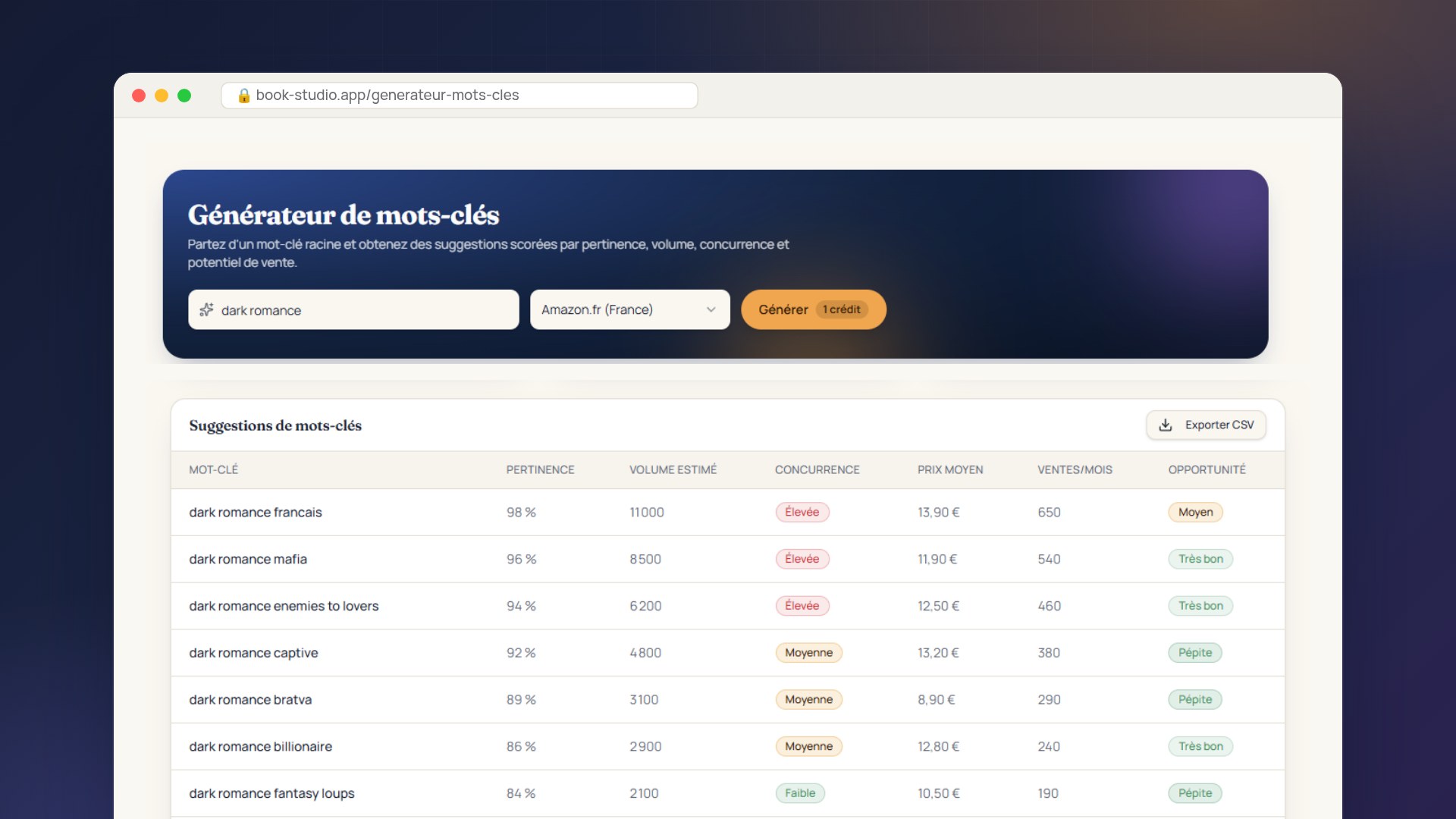
In Bookstudio’s Keyword Generator:
- Choose your target marketplace (Amazon.fr, Amazon.de, Amazon.com…).
- Enter your seed keyword: your genre or main theme, such as dark romance.
- Generate keywords in one click to explore the entire niche. Your searches stay saved, so you can switch between projects without running the analysis again.
3. Review the summary and top opportunity
The tool does more than display columns of raw data: it analyzes the market to show you immediately which publishing and advertising decisions to make.
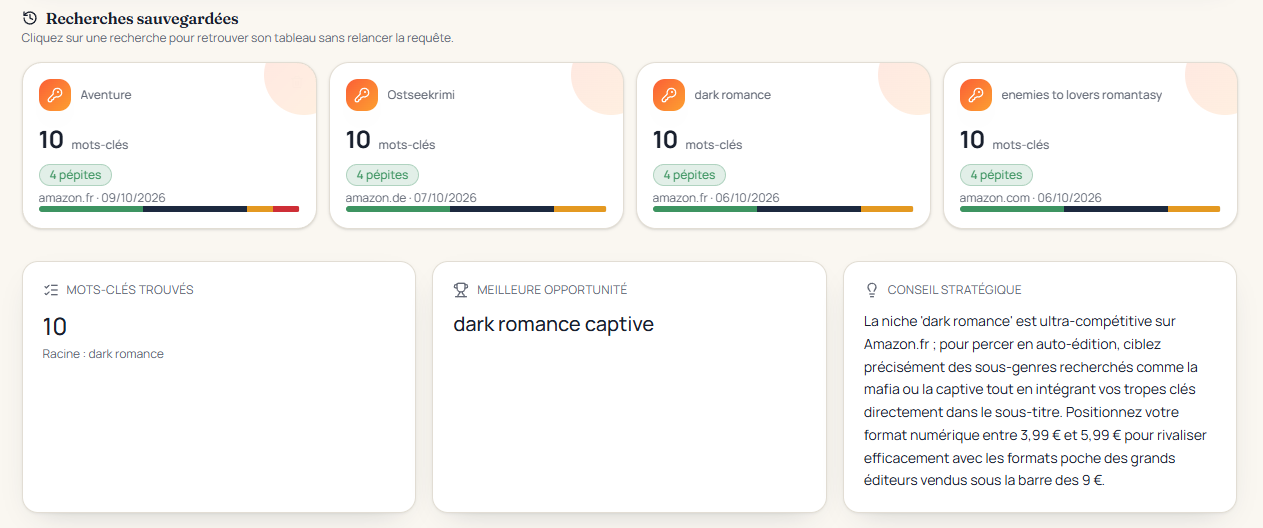
The summary highlights three key insights:
- The total number of relevant keywords found for this topic.
- The “best opportunity”: the search term with the strongest balance of volume and competition for gaining traction quickly (in our example: dark romance captive).
- Personalized strategic advice: here, include popular tropes (mafia, captive) in the subtitle and price the ebook between €3.99 and €5.99 to maintain a clear advantage over paperback editions selling for under €9.
4. Spot hidden gems: understand the buying signals
To choose terms that drive organic sales and profitable ad clicks, assess estimated search volume, competition, average market price and estimated monthly sales together.
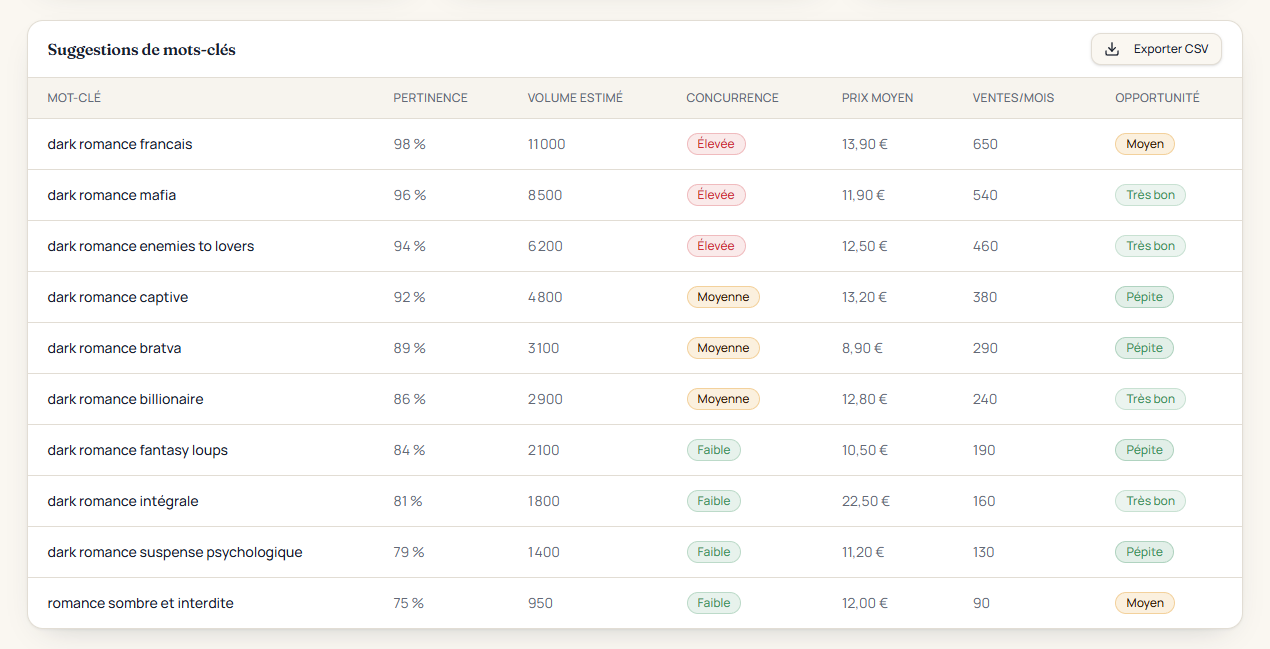
The 3 types of keywords
- The high-volume trap: dark romance francais attracts 11,000 searches per month, but competition is high and its opportunity rating is only “Average.” Competing here without hundreds of reviews is ineffective.
- Hidden gems (your core targets): searches such as dark romance captive (4,800 searches, 380 sales per month, medium competition) or dark romance bratva (3,100 searches, 290 sales per month) strike the right balance between real demand and manageable competition.
- Micro-niches (quick wins): low-competition terms such as dark romance fantasy loups (2,100 searches) or dark romance suspense psychologique (1,400 searches) can help a new book reach the first page quickly.
5. Putting it into practice: fill your 7 KDP keyword boxes effectively
To maximize your free organic visibility through the KDP dashboard, follow these rules:
- Never repeat words already in your title or subtitle: Amazon already takes them into account. Use the boxes for variations and additional tropes.
- Make the most of the 50 characters in each box: combine several words separated by a single space (for example: captive bratva mafia suspense psychologique). Amazon can recombine these terms to match readers’ searches.
- Skip the commas: they use up characters without adding value.
- No brand names or competing authors’ names: Amazon’s rules prohibit them, and your listing could be blocked.
6. Putting it into practice: profitable Amazon Ads campaigns
The same Bookstudio research provides a ready-made foundation for your Sponsored Products campaigns:
- Stop wasting your budget on overly broad searches: with highly competitive generic terms (such as dark romance francais), cost per click soars, curious browsers click without buying and your ACOS reaches unprofitable levels.
- Prioritize hidden gems with exact and phrase match: searches such as dark romance captive, dark romance bratva or dark romance fantasy loups face less competition, making bids cheaper, while highly specific buying intent boosts conversion rates.
- Export in one click: Bookstudio’s “Export CSV” button lets you download the list and paste your keywords straight into the Amazon Ads console.
Key takeaways
Optimizing your metadata and advertising does not have to be a gamble. Replace guesswork with concrete search data, and turn your 7 KDP keyword boxes and sponsored campaigns into a steady, predictable source of sales.