Bookstudio Reader network: the end-of-book QR code that brings you new readers
The last page of a book is a unique moment: the reader has just spent hours with your story, they are hooked and already wondering what to read next. Yet in most self-published books, that moment is lost. The reader closes the book, and that's it.
Bookstudio's Reader network turns that last page into a doorway. You place a QR code at the end of your book. Your readers discover a book by another author in the same genre and, in return, the network shows your book to other authors' readers. This guide explains how it all works, simply.
The idea in one sentence
You send your readers to other authors, and the network sends their readers back to you. It is a fair exchange between independent authors writing in the same genre and the same language: nobody pays for ads, everyone simply shares the audience they already have.
How it works, step by step
- You add your book on the Reader network page: ASIN, marketplace, title, author name, genre, book language and a short hook (the pitch).
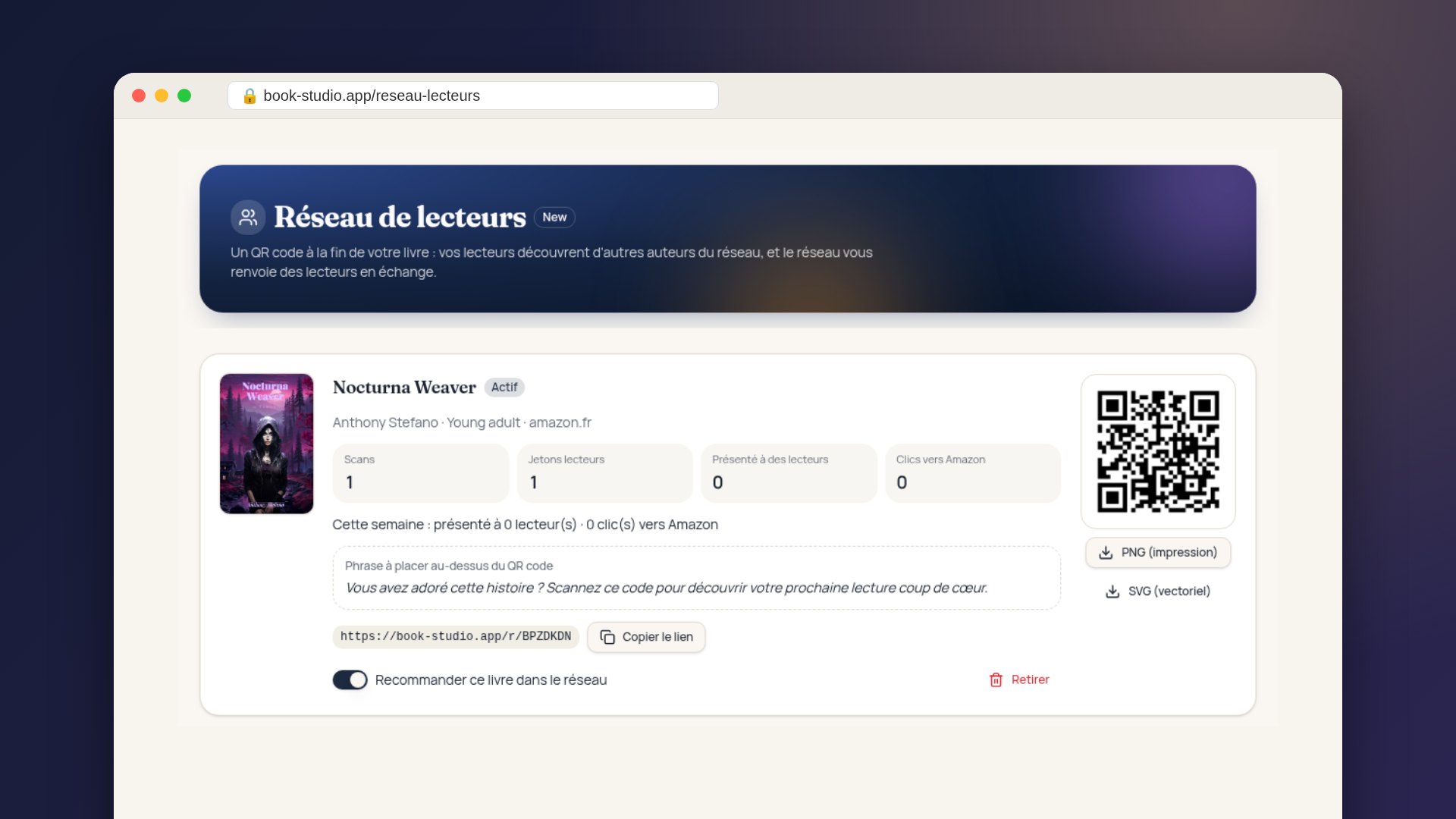
- Bookstudio creates a unique QR code and short link for this book. You download them as PNG for print or as SVG, a format that stays sharp at any size.
- You place the QR code at the end of your book, on the last page of your paperback or ebook, with the suggested line: “Loved this story? Scan this code to discover your next favorite read.”
- A reader scans the code with their phone. They land on an elegant page, in your book's language, that recommends a book by another author in the network, with its cover, its pitch and an “Order on Amazon” button.
- You earn 1 reader token. That token lets the network show your book, in turn, to a reader who finishes another author's book.
Ebook or print?
The QR code is ideal for paperbacks and hardcovers. In an ebook, also add the short link under the code: on an e-reader or tablet, the reader can simply tap the link.
Reader tokens, explained simply
The network runs on a small exchange currency: reader tokens. They are completely separate from the Bookstudio credits you use for the tools (research, keywords, audits…). Using the network never spends your credits.
| What happens | Effect on your tokens |
|---|---|
| A reader scans your book's QR code | +1 reader token |
| Your book is shown to a reader at the end of another author's book | -1 reader token |
| A reader clicks “Order on Amazon” for your book | None: the click is free and is added to your stats |
In other words, every reader you send to the network earns you a reader in return. The more your QR code is scanned, the more your book travels. The rate is the same on every plan: 1 scan = 1 token.
A concrete example
Claire writes romance in English. She adds her book to the network and prints the QR code at the end of her paperback. Over one month, 30 different readers scan the code. Claire earns 30 reader tokens, and her readers discover other romances by network authors.
Thanks to those 30 tokens, the network shows her book to 30 readers who have just finished a romance in English. These are not random visitors: they are readers who love her genre and are looking for their next read. Some click “Order on Amazon” and land directly on her book's page.
Who is your book shown to?
The network does not show your book to just anyone. It follows precise rules so that every showing makes sense:
- The same genre: a thriller reader discovers a thriller, a romantasy reader discovers a romantasy.
- The same language: a reader only sees books written in the language of the book they just finished.
- The same marketplace first: a reader who buys on Amazon.com first sees books available on Amazon.com.
- Never your own book in exchange: showings paid with tokens always go to another author.
- Fair sharing: among the possible books, the one shown least recently goes first. Every author gets their turn.
Honest counting
To keep the exchange fair, the same phone only counts once per day and per book, and bots are never counted. Scanning your own code ten times does not earn ten tokens.
What if the network is still small in your genre?
Your reader never lands on an empty page. If no book is available yet in your genre and language, the page suggests another of your books, if you have one in the network, or invites the reader to leave a review on Amazon. A review remains one of the best boosts for a self-published book.
Track your results in your account
No need to guess whether the network works: your Reader network page shows a weekly summary, in black and white:
- “Your book was shown to 8 qualified readers this week.”
- “3 readers clicked the “Order on Amazon” button.”
This summary only counts readers coming from other authors' books: strangers discovering your book purely thanks to the network. Each book also shows its counters: scans of your QR code, available reader tokens, number of showings and clicks to Amazon.
Placing your QR code without breaking Amazon's rules
Recommending other books at the end of a book is common practice, but Amazon may flag back matter overloaded with advertising. A few good practices:
- One discreet QR code on the last page, with the hook line above it.
- Print it on a white background, at least 1 inch (2.5 cm) wide, so it scans easily.
- Test it with your phone before uploading your file to KDP.
- One code per book: each book has its own QR code, so scans are credited correctly.
Good to know
The printed link always points to book-studio.app. It stays valid even if you change plans: books already printed will never lead to a broken page.
Who can use the Reader network?
The Reader network is included in the Starter, Pro and Publisher subscriptions, at no extra cost and without spending credits. One-off credit packs do not give access to the network, because the exchange relies on authors who stay active over time. Your books join the network automatically, with no approval to wait for.
What if I cancel my subscription?
- Your QR code keeps working: your readers still see a recommendation, never an empty page.
- You no longer earn tokens when your readers scan.
- Your book is no longer shown at the end of other authors' books.
- Your remaining tokens are kept: if you subscribe again, they work again immediately.
Put simply, without a subscription your readers keep sending visitors to other authors, but you no longer receive any in return.
Frequently asked questions
Does the network use my Bookstudio credits?
No. The network runs only on reader tokens, which you earn through scans. Your credits remain available for the tools.
Can I pause a book?
Yes. A switch on each book lets you stop recommending it in the network, then turn it back on whenever you like.
Can I add several books?
Yes, each book gets its own QR code, short link and stats. Each book earns and spends its own tokens.
Does the network guarantee sales?
No, and nobody can honestly promise that. The network brings you qualified readers who love your genre and are looking for their next read. After that, your cover, your pitch and your Amazon page make the difference. That is why we recommend polishing your pitch: it is the first thing the reader sees under your cover.
Get started in 5 minutes
Add your book, download its QR code and place it at the end of your next edition. With every reader who scans, your book gets a new chance to be discovered by a reader who didn't know you yet.