How to Lower Your ACoS on Amazon Ads: a Step-by-Step Audit Method
Your Amazon Ads campaigns are running, clicks are coming in, but your ACoS is higher than what each book earns you. Good news: a high ACoS almost always comes from a handful of search terms that cost money without selling, plus a few badly set bids. This article shows you how to find them and what to do, using Bookstudio's Amazon Ads Audit. If ACoS is new to you, start with our guide Amazon Ads ACOS: a guide for KDP authors.
Before lowering your ACoS, know your target ACoS
Lowering ACoS is not a goal in itself: a 0% ACoS means your ads are switched off, so zero ad sales. The real goal is to stay below your break-even point, meaning you never pay more in clicks than you earn on each copy.
Your break-even ACoS
net royalty per copy ÷ list price × 100
- Paperback sold at $12.99 earning you about $3.25 after printing: break-even around 25%.
- Ebook sold at $4.99 earning you about $3.40: break-even around 68%.
These figures are rounded: use your real royalty from the KDP pricing screen. If your book is in Kindle Unlimited, pages read also earn money, and they don't show up in ad sales. An ACoS slightly above break-even can therefore still be profitable.
Why your ACoS gets out of hand
- Automatic campaigns left unchecked: Amazon tests searches that sometimes have nothing to do with your book.
- Broad-match keywords that trigger your ads on related searches… that don't buy.
- The same bid for everything, even though some terms sell and others never do.
- An expensive placement, such as top of search, paid at full price with no sales to show for it.
- A product page that doesn't convert: readers click, look at the cover, price or reviews… and leave.
- Stopped campaigns relaunched as they were, with the same losing terms.
Step 1: export the right Amazon Ads report
- Open your Amazon Ads console and go to Reports, then Create report.
- Choose Sponsored Products and the Search term report type.
- Select a period of at least 30 days, so there are enough clicks to analyse.
- Download the file as CSV. If it arrives as Excel (.xlsx), open it and save it as CSV.
Which report should you choose?
The Search term report is the most useful for lowering ACoS: it shows what readers actually typed before clicking. The audit also reads Targeting, Campaign, Advertised product and Placement reports, to check other settings.
Step 2: run the audit in Bookstudio
In Bookstudio, open Amazon Ads Audit and drop your file (.csv or .txt). It is sent as is, unchanged. Then fill in, if you know them, the marketplace, the list price, your net royalty and whether the book is in Kindle Unlimited. These details are optional, but they let the audit work out your real break-even point. Without them, it uses an estimated break-even and tells you so.
The audit costs 1 credit. The result usually appears within a few dozen seconds, with amounts in your marketplace's currency.
Step 3: read the audit result
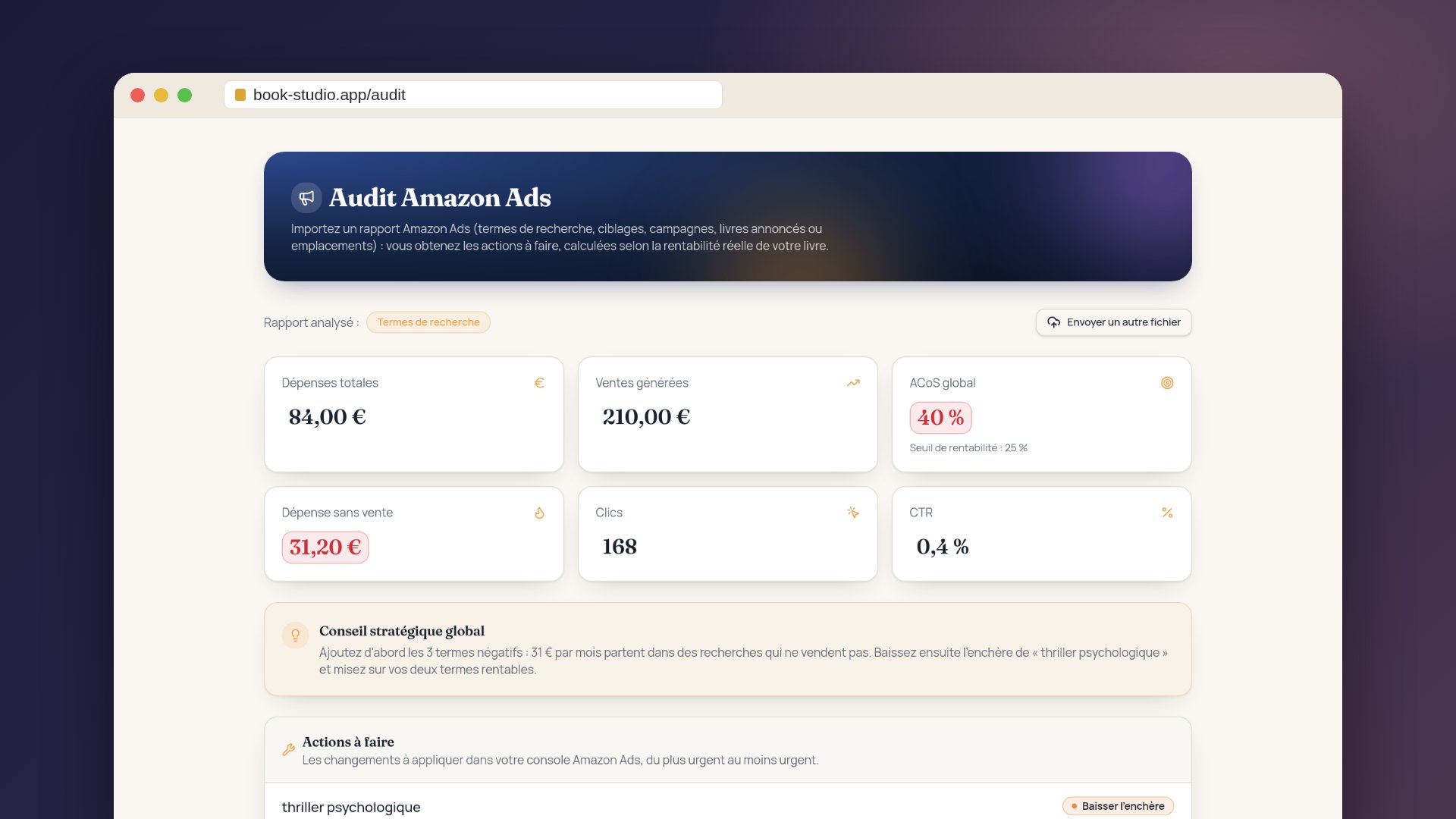
- Key figures: spend, sales generated, overall ACoS (green below your break-even, red above), spend without sales and click-through rate. With Kindle Unlimited, the audit includes page-read royalties when the report contains them.
- Global strategic advice: the number-one priority for your campaigns, in a few sentences.
- Actions to take, from most to least urgent: for each term, the campaign, spend, ACoS, the reason and the action to apply (pause, lower the bid, reduce the budget, adjust the placement, review the product page or raise the bid). Your current bid and Amazon's suggested bid are shown when available.
- Negative keywords to add (Search term report): searches that cost clicks without a single sale, with a button to copy the list.
- Opportunities to grow: profitable terms that deserve more budget, including paused ones worth reactivating.
- Don't relaunch as is and Never served: stopped items that lost money, and keywords that never got a single impression.
Step 4: apply the actions in Amazon Ads
- Add the negative keywords to the relevant campaign as negative exact: it's often the quickest win.
- Lower bids in steps of 10 to 20% on terms that are too expensive, rather than cutting everything at once.
- Pause terms that spend a lot without ever selling.
- Isolate profitable terms in a manual exact-match campaign with a controlled bid.
- If the audit tells you to review the product page, work on the cover, description, price or reviews: ads bring visitors, they don't fix a page that fails to convince.
- Write down the date of your changes so you can measure their effect.
Give the numbers time
A sale can be attributed to an ad several days after the click. Wait at least two weeks before judging a change.
Step 5: repeat the audit regularly
Two to four weeks after your changes, export a new report for the period that followed, run the audit again and compare overall ACoS and spend without sales. For most authors, one audit a month is enough to keep campaigns healthy.
Example: going from 40% to 25% ACoS
Illustrative example with made-up figures: Claire sells a paperback thriller at $12.99 that earns her $3.25. Her break-even is therefore about 25%. Over 30 days she spent $84 for $210 in sales, an ACoS of 40%.
The audit shows that $31 went on terms that sold nothing (searches that were too broad, another language, other authors' titles), and that two specific terms sell at an ACoS close to 15%. Claire adds the negatives, lowers the bids that are too high and raises the bid on her two profitable terms.
| Before | After | |
|---|---|---|
| Spend | $84 | $53 |
| Ad sales | $210 | $210 |
| ACoS | 40% | ≈ 25% |
In real life, sales move too. But by removing spend without sales first, you lower ACoS without touching the clicks that sell.
Mistakes to avoid
- Switching off all your ads: ACoS disappears, and so do sales, and your ranking may slip.
- Changing everything at once: you won't know what worked.
- Judging after three days: the figures are still incomplete.
- Aiming for the lowest possible ACoS instead of staying below break-even with as many sales as possible.
- Forgetting Kindle Unlimited when working out profitability.
- Excluding a term after two clicks: the audit flags rows with little data, so wait until you have more.
In short
To lower your ACoS: work out your break-even point, export your Search term report, have it audited, apply negatives and bid cuts first, then measure two to four weeks later. Bookstudio's Amazon Ads Audit does the sorting for you and tells you what to change, term by term.